
Wednesday, December 10, 2008
Oracle 11gR2 Installation on RHEL 4
Wednesday, December 10, 2008
Dataguard Adventures - Part I...!!!!!
Wednesday, December 10, 2008
Dataguard Adventures - Part II...!!!!!…
Wednesday, December 10, 2008
When ASM rebalancing stops...!!!!
Monday, December 8, 2008
Reducing Downtime during database movement and migrations
Putting a RAC database in ARCHIVELOG
1) Login to one of the rac node (orarac1) and disable the cluster_database parameter by setting it to FALSE. Also add the archivelog parameters.
SQL> connect / as sysdba
SQL> alter system set cluster_database=FALSE scope=spfile;
SQL> alter system set log_archive_dest_1='+DATADG' scope=spfile;
SQL> alter system set log_archive_format='orcl_%t_%s_%r.arc; scope=spfile;
2) Shutdown the database from cluster
[oracle@orarac1 ~]$ srvctl stop database -d orcl
3) Mount the database on the local instance (orarac1:orcl1)
[oracle@orarac1 ~]$
SQL> startup mount
ORACLE instance started.
Total System Global Area 135337420 bytes
Fixed Size 452044 bytes
Variable Size 109051904 bytes
Database Buffers 25165824 bytes
Redo Buffers 667648 bytes
Database mounted.
SQL>
4) Put the database into ARCHIVELOG
SQL> alter database archivelog
SQL> archive log list
Database log mode Archive Mode
Automatic archival Enabled
Archive destination +DATADG
Oldest online log sequence 33
Next log sequence to archive 34
Current log sequence 34
SQL>
5) Put the database back to cluster mode by setting the parameter cluster_database to TRUE and shut it down on current node (orarac1)
SQL> alter system set cluster_database=TRUE scope=spfile;
SQL> shutdown immediate
6) Startup the database in cluster
[oracle@orarac1 ~]$srvctl start database -d orcl
This will put the database back into cluster with archivelog enabled.
--Rishi


PLS-00201: identifier 'DBMS_LOB' must be declared error while installing Oracle Text
SQL> select comp_name, status, substr(version,1,10) as version from dba_registry where comp_id = 'CONTEXT';
COMP_NAME STATUS VERSION
-------------------------------------------------------------- ----------
Oracle Text INVALID 10.2.0.4.0
Reason being,
SQL> select object_name, object_type, status from dba_objects
where owner='CTXSYS' and status != 'VALID'
order by object_name;
2 3
OBJECT_NAME OBJECT_TYPE STATUS
--------------------------------------------------------------------------------
CTX_DOC PACKAGE BODY INVALID
CTX_REPORT PACKAGE BODY INVALID
DRIDOC PACKAGE BODY INVALID
DRIREP PACKAGE BODY INVALID
DRVDOC PACKAGE BODY INVALID
DRVIMR PACKAGE BODY INVALID
Tried this to fix,
SQL> show user
USER is "SYS"
QL> alter package ctxsys.CTX_DOC compile body;
Warning: Package Body altered with compilation errors.
SQL> show err
No errors.
SQL> connect ctxsys/*****
Connected.
SQL> alter package CTX_DOC compile body;
Warning: Package Body altered with compilation errors.
SQL> show err
Errors for PACKAGE BODY CTX_DOC:
LINE/COL ERROR
-------- -----------------------------------------------------------------
389/7 PL/SQL: Statement ignored
389/7 PLS-00201: identifier 'DBMS_LOB' must be declared
SQL> connect / as sysdba
Connected.
SQL> grant execute on sys.DBMS_LOB to ctxsys;
Grant succeeded.
SQL> connect ctxsys/winter08
Connected.
SQL> alter package CTX_DOC compile body;
Package body altered.
SQL> show err
No errors.
SQL> select object_name, object_type, status from dba_objects
where owner='CTXSYS' and status != 'VALID'
order by object_name;
no rows selected
Compiled all the invalid objects but still...
SQL> select comp_name, status, substr(version,1,10) as version from dba_registry where comp_id = 'CONTEXT'; 2
COMP_NAME STATUS VERSION
-------------------------------------------------------------- ----------
Oracle Text INVALID 10.2.0.4.0
Fix
1) De-install Oracle Text using the same metalink note (280713.1).
2) Execute the following statement from another session immediately after firing the Oracle text installation script (
@?/ctx/admin/catctx.sql CTXSYS SYSAUX TEMP NOLOCK)SQL> grant execute on sys.DBMS_LOB to ctxsys;
Grant succeeded.
This would assign the required privilege to CTXSYS user immediately after oracle text creation script and by the time script finishes, it already has the privilege and objects won't get invalidated.
Another method to fix it is
The instalalltion script (
@?/ctx/admin/catctx.sql) calls another script (@?/ctx/admin/ctxsys.sql) to create CTXSYS user for Oracle Text installation. This (ctxsys.sql) script creates CTXSYS user and assign the required privileges for installation. Just at the start of script where this script assigns privileges to CTXSYS user, add the following line (to ctxsys.sql script)SQL> grant execute on sys.DBMS_LOB to ctxsys;
Once done,install Oracle Text. This installation will not invalidate the package bodies and the instalallation would be valid.
SQL> select comp_name, status, substr(version,1,10) as version from dba_registry where comp_id = 'CONTEXT'; 2
COMP_NAME STATUS VERSION
-------------------------------------------------------------- ----------
Oracle Text VALID 10.2.0.4.0
Cheers...!!!
--Rishi
Upgrade 10g RAC to 11gR2
-- Rishi
Oracle 11gR2 Installation on RHEL 4
Oracle released 11g Release 2 and I was just waiting to get my fingers on it…!!! So downloaded the software from OTN and installed it on Linux. As of now, the software is available only on Linux.
The installation screens are catchy, oracle has left those blue installation screens of OUI, so altogether new screens. Another thing that I noticed that installation took damn good time, the reason being moving between the screens took lots and lots of time. I was doing the installation on remote server using Xmanager, but I don’t think that could be the reason for slowness, already installed 10g lot of times on the server and it was damn good.
Another new thing is the software can be installed for single instance or RAC installation. There is an option to check the language during software installation. There is an option to create response file at the end of installation which can help in future installations. So my software download is complete…Let's get to real work…
Download Software
Download the following software from OTN
http://www.oracle.com/technology/software/products/database/index.html
Oracle Database 11g Release 2 (11.2.0.1.0) for Linuxx86
linux_11gR2_database_1of2.zip (1,285,396,902 bytes) (cksum -2237015228)
linux_11gR2_database_2of2.zip (995,359,177 bytes) (cksum - 2649514514)
Unpack Files
unzip linux_11gR2_database_1of2.zip
unzip linux_11gR2_database_2of2.zip
This will create a directory called database and extract both the zip files into it.
[root@oracle10g u02]# ls -rlt
total 2229520
drwxr-xr-x 8 oracle dba 4096 Aug 19 01:24 database
drwx------ 2 root root 16384 Sep 12 15:07 lost+found
-rw-r--r-- 1 oracle dba 1285396902 Sep 12 15:54 linux_11gR2_database_1of2.zip
-rw-r--r-- 1 oracle dba 995359177 Sep 12 15:57 linux_11gR2_database_2of2.zip
[root@oracle10g u02]#
Minimum hardware requirements:
32-bit (x86)
- x86 compatible CPU
- 1 GB RAM
64-bit (x86_64)
- x86_64 compatible CPU
- 1 GB RAM
32-bit (x86) Installations
Check your kernel version by running the following command:
uname -r
[root@oracle10g ~]# uname -r
2.6.9-89.0.0.0.1.ELsmp
The minimum Linux version required for 11gR2 is RHEL 4.0
Required package versions (or later):
- compat-libstdc++-33-3.2.3-61
- elfutils-libelf-0.125-3.el5
- elfutils-libelf-devel-0.125-3.el5
- glibc-2.5-12
- glibc-devel-2.5-12
- glibc-common-2.5-12
- gcc-4.1.1-52.el5
- gcc-c++-4.1.1-52.el5
- kernel-headers
- libgcc-4.1.1-52.el5
- libaio-0.3.106-3.2
- libaio-devel-0.3.106-3.2
- libstdc++-4.1.1-52.el5
- libstdc++-devel-4.1.1-52.el5
- unixODBC-2.2.11-7.1
- unixODBC-devel-2.2.11-7.1
- sysstat-7.0.0-3.el5
- binutils-2.17.50.0.6-2.el5
- make-3.81-1.1
Run the following command to check the RPMs.
rpm -q binutils-2.15.92.0.2 \
compat-libstdc++-33.2.3 \
elfutils-libelf-0.97 \
elfutils-libelf-devel-0.97 \
gcc-3.4.6 \
gcc-c++-3.4.6 \
glibc-2.3.4-2.41 \
glibc-common-2.3.4 \
glibc-devel-2.3.4 \
glibc-headers-2.3.4 \
libaio-devel-0.3.105 \
libaio-0.3.105 \
libgcc-3.4.6 \
libstdc++-3.4.6 \
libstdc++-devel-3.4.6 \
make-3.80 \
pdksh-5.2.14 \
sysstat-5.0.5 \
unixODBC-2.2.11 \
unixODBC-devel-2.2.11
Create the Oracle Groups and User Account
Next, create the Linux groups and user account that will be used to install and maintain the Oracle Database 11g Release 2 software. The user account will be called oracle, and the groups will be oinstall and dba. I usually use only dba group in my installations.Execute the following commands as root:
# /usr/sbin/groupadd dba
# /usr/sbin/useradd -m -g dba oracle

# id oracle
uid=501(oracle) gid=502(oinstall) groups=502(oinstall),503(dba)
Set the password on the oracle account:
passwd oracle

# passwd oracle
Changing password for user oracle.
New password:
Retype new password:
passwd: all authentication tokens updated successfully.
Configuring the Linux Kernel Parameters
Oracle Database 11g Release 2 requires the kernel parameter settings shown below. The values given are minimum, so if your system uses a larger value, don't change it. Linux allows modification of most kernel parameters while the system is up and running, so there's no need to reboot the system after making kernel parameter changes.
cat >> /etc/sysctl.conf <
kernel.shmall = 2097152
kernel.shmmax = 536870912
kernel.shmmni = 4096
kernel.sem = 250 32000 100 128
fs.file-max = 6815744
fs.aio-max-nr = 1048576
net.ipv4.ip_local_port_range = 9000 65500
net.core.rmem_default=262144
net.core.wmem_default=262144
net.core.rmem_max=4194304
net.core.wmem_max=1048586
EOF
Setting shell limits for the oracle user
Oracle recommends setting limits on the number of processes and open files each Linux account may use. To make these changes, cut and paste the following commands as root:
cat >> /etc/security/limits.conf <> /etc/pam.d/login <Change the default profile for bash and ksh as well as the default login script for cshell.
cat >> /etc/profile <> /etc/csh.login <
Installation
Log into the oracle user. If you are using X emulation then set the DISPLAY environmental variable:
DISPLAY=
Start the Oracle Universal Installer (OUI) by issuing the following command in the database directory:
[root@oracle10g database]# pwd
/u02/database
[root@oracle10g database]# ./runInstaller


So this was about the basic installation on Oracle 10gR2. Will share my next experiences with the product soon….!!!
Cheers..!!!
--Rishi
Upgrading Clusterware to patchset 3 (10.2.0.4)
I have my 10.2.0.1 clusterware running
[oracle@rac1 ~]$ crs_stat -t
Name Type Target State Host
------------------------------------------------------------
ora.orcl.db application ONLINE ONLINE rac1
ora....l1.inst application ONLINE ONLINE rac1
ora....l2.inst application ONLINE ONLINE rac2
ora....SM1.asm application ONLINE ONLINE rac1
ora....C1.lsnr application ONLINE ONLINE rac1
ora.rac1.gsd application ONLINE ONLINE rac1
ora.rac1.ons application ONLINE ONLINE rac1
ora.rac1.vip application ONLINE ONLINE rac1
ora....SM2.asm application ONLINE ONLINE rac2
ora....C2.lsnr application ONLINE ONLINE rac2
ora.rac2.gsd application ONLINE ONLINE rac2
ora.rac2.ons application ONLINE ONLINE rac2
ora.rac2.vip application ONLINE ONLINE rac2
Node-1
[root@rac1 bin]# ./crsctl query crs softwareversion
CRS software version on node [rac1] is [10.2.0.1.0]
[root@rac1 bin]# ./crsctl query crs activeversion
CRS active version on the cluster is [10.2.0.1.0]
Node-2
[root@rac2 bin]# ./crsctl query crs softwareversion
CRS software version on node [rac2] is [10.2.0.1.0]
[root@rac2 bin]# ./crsctl query crs activeversion
CRS active version on the cluster is [10.2.0.1.0]
Applying the patchset.
1) Stop service, db instance, asm and nodeapps on node 1 (rac1)
[oracle@rac1 ~]$ srvctl stop instance -i orcl1 -d orcl
[oracle@rac1 ~]$ srvctl stop asm -n rac1
[oracle@rac1 ~]$ srvctl stop nodeapps -n rac1
[oracle@rac1 ~]$ crs_stat -t
Name Type Target State Host
------------------------------------------------------------
ora.orcl.db application ONLINE ONLINE rac1
ora....l1.inst application OFFLINE OFFLINE
ora....l2.inst application ONLINE ONLINE rac2
ora....SM1.asm application OFFLINE OFFLINE
ora....C1.lsnr application OFFLINE OFFLINE
ora.rac1.gsd application OFFLINE OFFLINE
ora.rac1.ons application OFFLINE OFFLINE
ora.rac1.vip application OFFLINE OFFLINE
ora....SM2.asm application ONLINE ONLINE rac2
ora....C2.lsnr application ONLINE ONLINE rac2
ora.rac2.gsd application ONLINE ONLINE rac2
ora.rac2.ons application ONLINE ONLINE rac2
ora.rac2.vip application ONLINE ONLINE rac2
Don't stop the CRS daemons. They would be brought down later.
[root@rac1 bin]# ./crsctl check crs
CSS appears healthy
CRS appears healthy
EVM appears healthy
2) Unzip the patch (p6810189_10204_Linux-x86.zip) and invoke runInstaller
3) In the screenshot as shown below both the nodes are grayed out and there is not option to select one node (this was my assumpiton intially that rolling should apply one by one with node selection option)..Click Next to move ahead...

4) Once the installer completes, it will prompt to run the following two scripts.(Each node one at a time)
/u01/app/oracle/product/10.2.0/crs/bin/crsctl stop crs
/u01/app/oracle/product/10.2.0/crs/install/root102.sh
The first script stops the clusterware and after that second script completesthe patching...
[root@rac1 bin]# /u01/app/oracle/product/10.2.0/crs/bin/crsctl stop crs
Stopping resources.
Successfully stopped CRS resources
Stopping CSSD.
Shutting down CSS daemon.
Shutdown request successfully issued.
[root@rac1 bin]#
[root@rac1 bin]# /u01/app/oracle/product/10.2.0/crs/bin/crsctl check crs
Failure 1 contacting CSS daemon
Cannot communicate with CRS
Cannot communicate with EVM
[root@rac1 bin]#
[oracle@rac2 ~]$ crs_stat -t
Name Type Target State Host
------------------------------------------------------------
ora.orcl.db application ONLINE ONLINE rac2
ora....l1.inst application OFFLINE OFFLINE
ora....l2.inst application ONLINE ONLINE rac2
ora....SM1.asm application OFFLINE OFFLINE
ora....C1.lsnr application OFFLINE OFFLINE
ora.rac1.gsd application OFFLINE OFFLINE
ora.rac1.ons application OFFLINE OFFLINE
ora.rac1.vip application OFFLINE OFFLINE
ora....SM2.asm application ONLINE ONLINE rac2
ora....C2.lsnr application ONLINE ONLINE rac2
ora.rac2.gsd application ONLINE ONLINE rac2
ora.rac2.ons application ONLINE ONLINE rac2
ora.rac2.vip application ONLINE ONLINE rac2
[oracle@rac2 ~]$
[root@rac1 install]# /u01/app/oracle/product/10.2.0/crs/install/root102.sh
Creating pre-patch directory for saving pre-patch clusterware files
Completed patching clusterware files to /u01/app/oracle/product/10.2.0/crs
Relinking some shared libraries.
Relinking of patched files is complete.
WARNING: directory '/u01/app/oracle/product/10.2.0' is not owned by root
WARNING: directory '/u01/app/oracle/product' is not owned by root
WARNING: directory '/u01/app/oracle' is not owned by root
WARNING: directory '/u01/app' is not owned by root
WARNING: directory '/u01' is not owned by root
Preparing to recopy patched init and RC scripts.
Recopying init and RC scripts.
Startup will be queued to init within 30 seconds.
/etc/profile: line 59: ulimit: open files: cannot modify limit: Operation not permitted
Starting up the CRS daemons.
Waiting for the patched CRS daemons to start.
This may take a while on some systems.
.
10204 patch successfully applied.
clscfg: EXISTING configuration version 3 detected.
clscfg: version 3 is 10G Release 2.
Successfully accumulated necessary OCR keys.
Using ports: CSS=49895 CRS=49896 EVMC=49898 and EVMR=49897.
node
node 1: rac1 rac1-priv rac1
Creating OCR keys for user 'root', privgrp 'root'..
Operation successful.
clscfg -upgrade completed successfully
[root@rac1 install]#
The above scripts will automatically startup the clusterware on node 1 (and nodeapps,asm and instance if they are enabled for startup)
root@rac1 bin]# ./crs_stat -t
Name Type Target State Host
------------------------------------------------------------
ora.orcl.db application ONLINE ONLINE rac2
ora....l1.inst application ONLINE ONLINE rac1
ora....l2.inst application ONLINE ONLINE rac2
ora....SM1.asm application ONLINE ONLINE rac1
ora....C1.lsnr application ONLINE ONLINE rac1
ora.rac1.gsd application ONLINE ONLINE rac1
ora.rac1.ons application ONLINE ONLINE rac1
ora.rac1.vip application ONLINE ONLINE rac1
ora....SM2.asm application ONLINE ONLINE rac2
ora....C2.lsnr application ONLINE ONLINE rac2
ora.rac2.gsd application ONLINE ONLINE rac2
ora.rac2.ons application ONLINE ONLINE rac2
ora.rac2.vip application ONLINE ONLINE rac2
[root@rac1 bin]#
This is what i have in alertrac1
[cssd(30267)]CRS-1601:CSSD Reconfiguration complete. Active nodes are rac1 rac2 .
2009-09-10 14:32:18.880
[evmd(29572)]CRS-1401:EVMD started on node rac1.
2009-09-10 14:32:18.927
[crsd(29700)]CRS-1012:The OCR service started on node rac1.
2009-09-10 14:32:20.661
[crsd(29700)]CRS-1201:CRSD started on node rac1.
2009-09-10 14:32:31.424
[client(30665)]CRS-1804:Node rac1 upgraded to version 10.2.0.4.0.
2009-09-10 14:32:33.507
So the software version of clusterware change to 10.2.0.4 but it would be active only after upgrade of second node.
[root@rac1 bin]# ./crsctl query crs softwareversion
CRS software version on node [rac1] is [10.2.0.4.0]
[root@rac1 bin]# ./crsctl query crs activeversion
CRS active version on the cluster is [10.2.0.1.0]
[root@rac1 bin]#
5) Now is the time to repeat the scripts on node 2 (rac2). Before that shutdown the resources i.e.
[root@rac2 bin]# /u01/app/oracle/product/10.2.0/crs/bin/crsctl stop crs
Stopping resources.
Successfully stopped CRS resources
Stopping CSSD.
Shutting down CSS daemon.
Shutdown request successfully issued.
[oracle@rac1 ~]$ crs_stat -t
Name Type Target State Host
------------------------------------------------------------
ora.orcl.db application ONLINE OFFLINE
ora....l1.inst application ONLINE OFFLINE
ora....l2.inst application ONLINE OFFLINE
ora....SM1.asm application ONLINE ONLINE rac1
ora....C1.lsnr application ONLINE ONLINE rac1
ora.rac1.gsd application ONLINE ONLINE rac1
ora.rac1.ons application ONLINE ONLINE rac1
ora.rac1.vip application ONLINE ONLINE rac1
ora....SM2.asm application ONLINE OFFLINE
ora....C2.lsnr application ONLINE OFFLINE
ora.rac2.gsd application ONLINE OFFLINE
ora.rac2.ons application ONLINE OFFLINE
ora.rac2.vip application ONLINE OFFLINE
[root@rac2 install]# /u01/app/oracle/product/10.2.0/crs/install/root102.sh
Creating pre-patch directory for saving pre-patch clusterware files
Completed patching clusterware files to /u01/app/oracle/product/10.2.0/crs
Relinking some shared libraries.
Relinking of patched files is complete.
WARNING: directory '/u01/app/oracle/product/10.2.0' is not owned by root
WARNING: directory '/u01/app/oracle/product' is not owned by root
WARNING: directory '/u01/app/oracle' is not owned by root
WARNING: directory '/u01/app' is not owned by root
WARNING: directory '/u01' is not owned by root
Preparing to recopy patched init and RC scripts.
Recopying init and RC scripts.
Startup will be queued to init within 30 seconds.
/etc/profile: line 59: ulimit: open files: cannot modify limit: Operation not pe rmitted
Starting up the CRS daemons.
Waiting for the patched CRS daemons to start.
This may take a while on some systems.
.
10204 patch successfully applied.
clscfg: EXISTING configuration version 3 detected.
clscfg: version 3 is 10G Release 2.
Successfully accumulated necessary OCR keys.
Using ports: CSS=49895 CRS=49896 EVMC=49898 and EVMR=49897.
node
node 2: rac2 rac2-priv rac2
Creating OCR keys for user 'root', privgrp 'root'..
Operation successful.
clscfg -upgrade completed successfully
[root@rac2 install]#
[root@rac2 bin]# ./crsctl query crs softwareversion
CRS software version on node [rac2] is [10.2.0.4.0]
[root@rac2 bin]# ./crsctl query crs activeversion
CRS active version on the cluster is [10.2.0.4.0]
[root@rac2 bin]#
At the end of this script, everyhting would be brought up automatically.
[oracle@rac1 ~]$ crs_stat -t
Name Type Target State Host
------------------------------------------------------------
ora.orcl.db application ONLINE ONLINE rac1
ora....l1.inst application ONLINE ONLINE rac1
ora....l2.inst application ONLINE ONLINE rac2
ora....SM1.asm application ONLINE ONLINE rac1
ora....C1.lsnr application ONLINE ONLINE rac1
ora.rac1.gsd application ONLINE ONLINE rac1
ora.rac1.ons application ONLINE ONLINE rac1
ora.rac1.vip application ONLINE ONLINE rac1
ora....SM2.asm application ONLINE ONLINE rac2
ora....C2.lsnr application ONLINE ONLINE rac2
ora.rac2.gsd application ONLINE ONLINE rac2
ora.rac2.ons application ONLINE ONLINE rac2
ora.rac2.vip application ONLINE ONLINE rac2
[oracle@rac1 ~]$
This patched the CRS to 10.2.0.4...
-- Rishi
Adding Listener to OCR in 10g RAC
After CRS installation, this is what i had.
[oracle@rac1 ~]$ crs_stat -t
Name Type Target State Host
------------------------------------------------------------
ora.rac1.gsd application ONLINE ONLINE rac1
ora.rac1.ons application ONLINE ONLINE rac1
ora.rac1.vip application ONLINE ONLINE rac1
ora.rac2.gsd application ONLINE ONLINE rac2
ora.rac2.ons application ONLINE ONLINE rac2
ora.rac2.vip application ONLINE ONLINE rac2
[oracle@rac1 ~]$
Since the listeners were already there before clusterware re-install, so remove/move the old listener.ora and tnsnames.ora files.
Node-1
[oracle@rac1 admin]$ mv tnsnames.ora tnsnames.ora.old
[oracle@rac1 admin]$ mv listener.ora listener.ora.old
Node-2
[oracle@rac2 admin]$ mv tnsnames.ora tnsnames.ora.old
[oracle@rac2 admin]$ mv listener.ora listener.ora.old
Run NETCA to create the new listener. NETCA will sometimes popup an error saying the listener with name LISTENER already exists. So, delete the existing listener (with name LISTENER) and create a new listener again.
[oracle@rac1 admin]$ crs_stat -t
Name Type Target State Host
------------------------------------------------------------
ora....C1.lsnr application ONLINE ONLINE rac1
ora.rac1.gsd application ONLINE ONLINE rac1
ora.rac1.ons application ONLINE ONLINE rac1
ora.rac1.vip application ONLINE ONLINE rac1
ora....C2.lsnr application ONLINE ONLINE rac2
ora.rac2.gsd application ONLINE ONLINE rac2
ora.rac2.ons application ONLINE ONLINE rac2
ora.rac2.vip application ONLINE ONLINE rac2
Note:- After deleting the old listener, when you try to create the new listener (with name LISTENER), NETCA will agin popup the same error that listener exists. In that case, close NETCA and invoke it again to create the listener. It will work this time.
Cheers ...!!!
-- Rishi
Reinstalling CRS after loss of voting disk/ocr
Some time back i faced this issue while applying patchset on clusterware (the binaries got corrupted due to incorrect version of c++ libraries on AIX)..Recently i got this issue again when i lost my only voting disk. This is how i re-installed the clusterware and added resources to it.
1) Metalink doc 239998.1 is a good document to wipe out a CRS installation. Followed this doc for cleanup.
2) Installed the clusterware, ran root.sh, vipca and this is what i got after that.
oracle@rac1 ~]$ crs_stat -t
Name Type Target State Host
------------------------------------------------------------
ora.rac1.gsd application ONLINE ONLINE rac1
ora.rac1.ons application ONLINE ONLINE rac1
ora.rac1.vip application ONLINE ONLINE rac1
ora.rac2.gsd application ONLINE ONLINE rac2
ora.rac2.ons application ONLINE ONLINE rac2
ora.rac2.vip application ONLINE ONLINE rac2
3) Now is the time to add the listener to OCR. Remove/move the old network files on both nodes.
[oracle@rac1 admin]$ mv tnsnames.ora tnsnames.ora.old
[oracle@rac1 admin]$ mv listener.ora listener.ora.old
[oracle@rac2 admin]$ mv tnsnames.ora tnsnames.ora.old
[oracle@rac2 admin]$ mv listener.ora listener.ora.old
Run NETCA to add the new listener to cluster.
[oracle@rac1 admin]$ crs_stat -t
Name Type Target State Host
------------------------------------------------------------
ora....C1.lsnr application ONLINE ONLINE rac1
ora.rac1.gsd application ONLINE ONLINE rac1
ora.rac1.ons application ONLINE ONLINE rac1
ora.rac1.vip application ONLINE ONLINE rac1
ora....C2.lsnr application ONLINE ONLINE rac2
ora.rac2.gsd application ONLINE ONLINE rac2
ora.rac2.ons application ONLINE ONLINE rac2
ora.rac2.vip application ONLINE ONLINE rac2
So listeners added..
4) Now is the time to add asm,database,instance and services (if any)
ASM
[oracle@rac1 admin]$ srvctl add asm -n rac1 -i +ASM1 -o /u01/app/oracle/product/10.2.0/asm
[oracle@rac1 admin]$ srvctl add asm -n rac2 -i +ASM2 -o /u01/app/oracle/product/10.2.0/asm
[oracle@rac1 admin]$ srvctl start asm -n rac2
[oracle@rac1 admin]$ srvctl start asm -n rac2
Database
[oracle@rac1 admin]$ srvctl add database -d orcl -o /u01/app/oracle/product/10.2.0/db_1
[oracle@rac1 admin]$ srvctl add instance -i orcl1 -d orcl -n rac1
[oracle@rac1 admin]$ srvctl add instance -i orcl2 -d orcl -n rac2
[oracle@rac1 admin]$ srvctl start database -d orcl
This is what i got after running the above commands.
[oracle@rac1 admin]$ crs_stat -t
Name Type Target State Host
------------------------------------------------------------
ora.orcl.db application ONLINE ONLINE rac1
ora....l1.inst application ONLINE ONLINE rac1
ora....l2.inst application ONLINE ONLINE rac2
ora....SM1.asm application ONLINE ONLINE rac1
ora....C1.lsnr application ONLINE ONLINE rac1
ora.rac1.gsd application ONLINE ONLINE rac1
ora.rac1.ons application ONLINE ONLINE rac1
ora.rac1.vip application ONLINE ONLINE rac1
ora....SM2.asm application ONLINE ONLINE rac2
ora....C2.lsnr application ONLINE ONLINE rac2
ora.rac2.gsd application ONLINE ONLINE rac2
ora.rac2.ons application ONLINE ONLINE rac2
ora.rac2.vip application ONLINE ONLINE rac2
[oracle@rac1 admin]$
So my cluster is up with all the existing resources resgistered....
-- Rishi
root.sh - Oracle CRS stack is already configured and will be running under init(1M)
I did a cleanup as per metalink note 239998.1 (How to Clean Up After a Failed Oracle Clusterware (CRS) Installation) for Linux. Everything went smooth until the installation prompted for root.sh execution.
[root@rac1 crs]# mv /etc/oracle/ocr.loc /etc/oracle/ocr.loc.old
[root@rac1 crs]# ./root.sh
WARNING: directory '/u01/app/oracle/product/10.2.0' is not owned by root
WARNING: directory '/u01/app/oracle/product' is not owned by root
WARNING: directory '/u01/app/oracle' is not owned by root
WARNING: directory '/u01/app' is not owned by root
WARNING: directory '/u01' is not owned by root
Checking to see if Oracle CRS stack is already configured and will be running under init(1M)
oops....!!!!
Thought i forgot to do cleanup of ocr and voting disk raw devices, although this was not case...I did zeroing of ocr and voting disk rawdevices again...and tried again..no luck...!!!!
Again checked the metalink note...and realised that i forgot to delete /etc/oracle/ocr.loc. This is file which is created by root.sh and since it was already present, so root.sh was failing.
Removed the file and it worked...Same thing was done for 2nd node of RAC before running root.sh
[root@rac1 crs]# mv /etc/oracle/ocr.loc /etc/oracle/ocr.loc.old
[root@rac1 crs]# ./root.sh
WARNING: directory '/u01/app/oracle/product/10.2.0' is not owned by root
WARNING: directory '/u01/app/oracle/product' is not owned by root
WARNING: directory '/u01/app/oracle' is not owned by root
WARNING: directory '/u01/app' is not owned by root
WARNING: directory '/u01' is not owned by root
Checking to see if Oracle CRS stack is already configured
Setting the permissions on OCR backup directory
Setting up NS directories
Oracle Cluster Registry configuration upgraded successfully
WARNING: directory '/u01/app/oracle/product/10.2.0' is not owned by root
WARNING: directory '/u01/app/oracle/product' is not owned by root
WARNING: directory '/u01/app/oracle' is not owned by root
WARNING: directory '/u01/app' is not owned by root
WARNING: directory '/u01' is not owned by root
assigning default hostname rac1 for node 1.
assigning default hostname rac2 for node 2.
Successfully accumulated necessary OCR keys.
Using ports: CSS=49895 CRS=49896 EVMC=49898 and EVMR=49897.
node
node 1: rac1 rac1-priv rac1
node 2: rac2 rac2-priv rac2
Creating OCR keys for user 'root', privgrp 'root'..
Operation successful.
Now formatting voting device: /dev/raw/raw2
Format of 1 voting devices complete.
Startup will be queued to init within 90 seconds.
Adding daemons to inittab
Expecting the CRS daemons to be up within 600 seconds.
CSS is active on these nodes.
rac1
CSS is inactive on these nodes.
rac2
Local node checking complete.
Run root.sh on remaining nodes to start CRS daemons.
[root@rac1 crs]#
Cheers..!!!!
--Rishi
Dataguard Adventures ...!!!!! - Part II
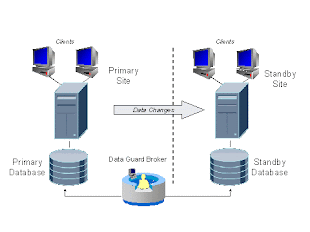
In my last post,we eneded up with primary shipping archivelogs to standby that are being applied to standby.The next steps would be to setup DG BROKER for this setup to automate switchover and failover.
Downtime required ???? …YES…! For what???? ….To test the switchover between primary and physical standby..>And how much….30 minutes

Make sure that both the primary and standby should be up using spfile. If not create the spfile and take a bounce. My primary wukprd is already running with spfile but standby is still on pfile (as mentioned in my previous post). So I’ll create an spfile from standby and take a database bounce to startup the database using spfile.
1) Configure DG Broker initialization parameters.
a) Configure on primary
SQL> select NAME,ISSYS_MODIFIABLE from v$parameter where name like '%broker%';
NAME ISSYS_MOD
-------------------------------------------------- ---------
dg_broker_start IMMEDIATE
dg_broker_config_file1 IMMEDIATE
dg_broker_config_file2 IMMEDIATE
SQL> !hostname
dguard1
SQL> show parameter dg_broker_start
NAME TYPE VALUE
------------------------------------ ----------- ------------------------------
dg_broker_start boolean FALSE
SQL> alter system set dg_broker_start=TRUE scope=both;
System altered.
SQL> show parameter broker
NAME TYPE VALUE
------------------------------------ ----------- ------------------------------
dg_broker_config_file1 string /u01/app/oracle/product/10.2.0
/dbs/dr1P_WUKPRD.dat
dg_broker_config_file2 string /u01/app/oracle/product/10.2.0
/dbs/dr2P_WUKPRD.dat
dg_broker_start boolean TRUE
SQL>
b) Repeat the above steps on standby.
SQL> !hostname
dguard2
SQL> show parameter broker
NAME TYPE VALUE
------------------------------------ ----------- ------------------------------
dg_broker_config_file1 string /u01/app/oracle/product/10.2.0
/dbs/dr1S_WUKPRD.dat
dg_broker_config_file2 string /u01/app/oracle/product/10.2.0
/dbs/dr2S_WUKPRD.dat
dg_broker_start boolean TRUE
SQL>
2) Configure network files.
a) Add the entry for DG Broker in network files (listener.ora) on primary
NOTE:
1)The value for the GLOBAL_DBNAME should be a
concatenation of the initialization parameters_DGMGRL.
2) Make sure you add GLOBAL_DBNAME entry under SID_DESC in listener.ora.
This is my primary listener.ora after changes.
# listener.ora Network Configuration File: /u01/app/oracle/product/10.2.0/network/admin/listener.ora
# Generated by Oracle configuration tools.
SID_LIST_LISTENER =
(SID_LIST =
(SID_DESC =
(SID_NAME = PLSExtProc)
(ORACLE_HOME = /u01/app/oracle/product/10.2.0)
(PROGRAM = extproc)
)
(SID_DESC =
(GLOBAL_DBNAME = wukprd)
(ORACLE_HOME = /u01/app/oracle/product/10.2.0)
(SID_NAME = wukprd)
)
(SID_DESC =
(GLOBAL_DBNAME = P_WUKPRD_DGMGRL)
(ORACLE_HOME = /u01/app/oracle/product/10.2.0)
(SID_NAME = wukprd)
)
)
LISTENER =
(DESCRIPTION_LIST =
(DESCRIPTION =
(ADDRESS = (PROTOCOL = TCP)(HOST = dguard1)(PORT = 1521))
)
(DESCRIPTION =
(ADDRESS = (PROTOCOL = IPC)(KEY = EXTPROC0))
)
)
b) Repeat the above steps on standby.
[oracle@dguard2 admin]$ cat listener.ora
# listener.ora Network Configuration File: /u01/app/oracle/product/10.2.0/network/admin/listener.ora
# Generated by Oracle configuration tools.
SID_LIST_LISTENER =
(SID_LIST =
(SID_DESC =
(SID_NAME = PLSExtProc)
(ORACLE_HOME = /u01/app/oracle/product/10.2.0)
(PROGRAM = extproc)
)
(SID_DESC =
(GLOBAL_DBNAME = wukprd)
(ORACLE_HOME = /u01/app/oracle/product/10.2.0)
(SID_NAME = wukprd)
)
(SID_DESC =
(GLOBAL_DBNAME = S_WUKPRD_DGMGRL)
(ORACLE_HOME = /u01/app/oracle/product/10.2.0)
(SID_NAME = wukprd)
)
)
LISTENER =
(DESCRIPTION_LIST =
(DESCRIPTION =
(ADDRESS = (PROTOCOL = TCP)(HOST = dguard2)(PORT = 1521))
(ADDRESS = (PROTOCOL = IPC)(KEY = EXTPROC0))
)
)
c) Reload the listener on both primary and standby.
[oracle@dguard1 admin]$ lsnrctl reload
LSNRCTL for Linux: Version 10.2.0.1.0 - Production on 08-SEP-2009 13:11:32
Copyright (c) 1991, 2005, Oracle. All rights reserved.
Connecting to (DESCRIPTION=(ADDRESS=(PROTOCOL=TCP)(HOST=dguard1)(PORT=1521)))
The command completed successfully
[oracle@dguard1 admin]$ lsnrctl status
LSNRCTL for Linux: Version 10.2.0.1.0 - Production on 08-SEP-2009 13:11:37
Copyright (c) 1991, 2005, Oracle. All rights reserved.
Connecting to (DESCRIPTION=(ADDRESS=(PROTOCOL=TCP)(HOST=dguard1)(PORT=1521)))
STATUS of the LISTENER
------------------------
Alias LISTENER
Version TNSLSNR for Linux: Version 10.2.0.1.0 - Production
Start Date 07-SEP-2009 18:40:32
Uptime 0 days 18 hr. 31 min. 5 sec
Trace Level off
Security ON: Local OS Authentication
SNMP OFF
Listener Parameter File /u01/app/oracle/product/10.2.0/network/admin/listener.ora
Listener Log File /u01/app/oracle/product/10.2.0/network/log/listener.log
Listening Endpoints Summary...
(DESCRIPTION=(ADDRESS=(PROTOCOL=tcp)(HOST=dguard1)(PORT=1521)))
(DESCRIPTION=(ADDRESS=(PROTOCOL=ipc)(KEY=EXTPROC0)))
Services Summary...
Service "PLSExtProc" has 1 instance(s).
Instance "PLSExtProc", status UNKNOWN, has 1 handler(s) for this service...
Service "P_WUKPRD" has 1 instance(s).
Instance "wukprd", status READY, has 1 handler(s) for this service...
Service "P_WUKPRD_DGB" has 1 instance(s).
Instance "wukprd", status READY, has 1 handler(s) for this service...
Service "P_WUKPRD_DGMGRL" has 1 instance(s).
Instance "wukprd", status UNKNOWN, has 1 handler(s) for this service...
Service "P_WUKPRD_XPT" has 1 instance(s).
Instance "wukprd", status READY, has 1 handler(s) for this service...
Service "wukprd" has 1 instance(s).
Instance "wukprd", status UNKNOWN, has 1 handler(s) for this service...
Service "wukprdXDB" has 1 instance(s).
Instance "wukprd", status READY, has 1 handler(s) for this service...
The command completed successfully
[oracle@dguard1 admin]$
On Standby
[oracle@dguard2 admin]$ lsnrctl reload
LSNRCTL for Linux: Version 10.2.0.1.0 - Production on 08-SEP-2009 13:18:11
Copyright (c) 1991, 2005, Oracle. All rights reserved.
Connecting to (DESCRIPTION=(ADDRESS=(PROTOCOL=TCP)(HOST=dguard2)(PORT=1521)))
The command completed successfully
[oracle@dguard2 admin]$ lsnrctl status
LSNRCTL for Linux: Version 10.2.0.1.0 - Production on 08-SEP-2009 13:18:15
Copyright (c) 1991, 2005, Oracle. All rights reserved.
Connecting to (DESCRIPTION=(ADDRESS=(PROTOCOL=TCP)(HOST=dguard2)(PORT=1521)))
STATUS of the LISTENER
------------------------
Alias LISTENER
Version TNSLSNR for Linux: Version 10.2.0.1.0 - Production
Start Date 07-SEP-2009 18:44:51
Uptime 0 days 18 hr. 33 min. 23 sec
Trace Level off
Security ON: Local OS Authentication
SNMP OFF
Listener Parameter File /u01/app/oracle/product/10.2.0/network/admin/listener.ora
Listener Log File /u01/app/oracle/product/10.2.0/network/log/listener.log
Listening Endpoints Summary...
(DESCRIPTION=(ADDRESS=(PROTOCOL=tcp)(HOST=dguard2)(PORT=1521)))
(DESCRIPTION=(ADDRESS=(PROTOCOL=ipc)(KEY=EXTPROC0)))
Services Summary...
Service "PLSExtProc" has 1 instance(s).
Instance "PLSExtProc", status UNKNOWN, has 1 handler(s) for this service...
Service "S_WUKPRD" has 1 instance(s).
Instance "wukprd", status READY, has 1 handler(s) for this service...
Service "S_WUKPRD_DGB" has 1 instance(s).
Instance "wukprd", status READY, has 1 handler(s) for this service...
Service "S_WUKPRD_DGMGRL" has 1 instance(s).
Instance "wukprd", status UNKNOWN, has 1 handler(s) for this service...
Service "S_WUKPRD_XPT" has 1 instance(s).
Instance "wukprd", status READY, has 1 handler(s) for this service...
Service "wukprd" has 1 instance(s).
Instance "wukprd", status UNKNOWN, has 1 handler(s) for this service...
The command completed successfully
[oracle@dguard2 admin]$
3) Creating DG Broker Configuration
a) On primary
[oracle@dguard1 ~]$ dgmgrl
DGMGRL for Linux: Version 10.2.0.1.0 - Production
Copyright (c) 2000, 2005, Oracle. All rights reserved.
Welcome to DGMGRL, type "help" for information.
DGMGRL> connect sys/sys123@P_WUKPRD
Connected.
DGMGRL>
DGMGRL> CREATE CONFIGURATION DGBROKER AS PRIMARY DATABASE IS P_WUKPRD CONNECT IDENTIFIER IS P_WUKPRD;
Configuration "dgbroker" created with primary database "p_wukprd"
b) Add the standby to the configuration and check it
DGMGRL> ADD DATABASE S_WUKPRD AS CONNECT IDENTIFIER IS S_WUKPRD
MAINTAINED AS PHYSICAL;
Database "S_WUKPRD" added
DGMGRL> show configuration;
Configuration
Name: dgbroker
Enabled: YES
Protection Mode: MaxPerformance
Fast-Start Failover: DISABLED
Databases:
p_wukprd - Primary database
s_wukprd - Physical standby database
Current status for "dgbroker":
DISABLED
So we are done with the creation of DG Broker Configuration and addition or primary and standby database to this configuration. The configuration has the current status as DISABLED.
c) Check database properties
DGMGRL> show database verbose P_WUKPRD
Database
Name: p_wukprd
Role: PRIMARY
Enabled: YES
Instance(s):
wukprd
Properties:
InitialConnectIdentifier = 'P_WUKPRD'
LogXptMode = 'ASYNC'
Dependency = ''
DelayMins = '0'
Binding = 'OPTIONAL'
MaxFailure = '0'
MaxConnections = '1'
ReopenSecs = '300'
NetTimeout = '180'
LogShipping = 'ON'
PreferredApplyInstance = ''
ApplyInstanceTimeout = '0'
ApplyParallel = 'AUTO'
StandbyFileManagement = 'AUTO'
ArchiveLagTarget = '1200'
LogArchiveMaxProcesses = '2'
LogArchiveMinSucceedDest = '1'
DbFileNameConvert = ''
LogFileNameConvert = ''
FastStartFailoverTarget = ''
StatusReport = '(monitor)'
InconsistentProperties = '(monitor)'
InconsistentLogXptProps = '(monitor)'
SendQEntries = '(monitor)'
LogXptStatus = '(monitor)'
RecvQEntries = '(monitor)'
HostName = 'dguard1'
SidName = 'wukprd'
LocalListenerAddress = '(ADDRESS=(PROTOCOL=tcp)(HOST=dguard1)(PORT=1521))'
StandbyArchiveLocation = 'dgsby_P_WUKPRD'
AlternateLocation = ''
LogArchiveTrace = '0'
LogArchiveFormat = 'wukprd_%t_%s_%r.arc'
LatestLog = '(monitor)'
TopWaitEvents = '(monitor)'
Current status for "p_wukprd":
DISABLED
DGMGRL>
DGMGRL> show database verbose S_WUKPRD;
Database
Name: s_wukprd
Role: PHYSICAL STANDBY
Enabled: YES
Instance(s):
wukprd
Properties:
InitialConnectIdentifier = 'S_WUKPRD'
LogXptMode = 'ASYNC'
Dependency = ''
DelayMins = '0'
Binding = 'OPTIONAL'
MaxFailure = '0'
MaxConnections = '1'
ReopenSecs = '300'
NetTimeout = '180'
LogShipping = 'ON'
PreferredApplyInstance = ''
ApplyInstanceTimeout = '0'
ApplyParallel = 'AUTO'
StandbyFileManagement = 'AUTO'
ArchiveLagTarget = '1200'
LogArchiveMaxProcesses = '2'
LogArchiveMinSucceedDest = '1'
DbFileNameConvert = ''
LogFileNameConvert = ''
FastStartFailoverTarget = ''
StatusReport = '(monitor)'
InconsistentProperties = '(monitor)'
InconsistentLogXptProps = '(monitor)'
SendQEntries = '(monitor)'
LogXptStatus = '(monitor)'
RecvQEntries = '(monitor)'
HostName = 'dguard2'
SidName = 'wukprd'
LocalListenerAddress = '(ADDRESS=(PROTOCOL=tcp)(HOST=dguard2)(PORT=1521))'
StandbyArchiveLocation = '/u01/s_arch'
AlternateLocation = ''
LogArchiveTrace = '0'
LogArchiveFormat = 'wukprd_%t_%s_%r.arc'
LatestLog = '(monitor)'
TopWaitEvents = '(monitor)'
Current status for "s_wukprd":
DISABLED
DGMGRL>
4) Enabling the Broker Configuration
DGMGRL> enable configuration
Enabled.
DGMGRL> show configuration
Configuration
Name: dgbroker
Enabled: YES
Protection Mode: MaxPerformance
Fast-Start Failover: DISABLED
Databases:
p_wukprd - Primary database
s_wukprd - Physical standby database
Current status for "dgbroker":
SUCCESS
DGMGRL>
So we are done with the configuration of DG Broker for our setup.. Time to test switchover now.
DOWNTIME OF PRODUCTION STARTS HERE…!!!!
5) Testing switchover
a) On primary
DGMGRL> switchover to S_WUKPRD;
Performing switchover NOW, please wait...
Operation requires shutdown of instance "wukprd" on database "p_wukprd"
Shutting down instance "wukprd"...
ORA-01109: database not open
Database dismounted.
ORACLE instance shut down.
Operation requires shutdown of instance "wukprd" on database "s_wukprd"
Shutting down instance "wukprd"...
ORA-01109: database not open
Database dismounted.
ORACLE instance shut down.
Operation requires startup of instance "wukprd" on database "p_wukprd"
Starting instance "wukprd"...
ORACLE instance started.
Database mounted.
Operation requires startup of instance "wukprd" on database "s_wukprd"
Starting instance "wukprd"...
ORACLE instance started.
Database mounted.
Switchover succeeded, new primary is "s_wukprd"
DGMGRL>
Superb….!!!!! …Primary shutdown….Standby shutdown…primary started as standby and standby started as primary……..
Let’s check the role reversal movement and application of archivelogs.
SQL> !hostname
dguard1
SQL> select NAME,DB_UNIQUE_NAME,OPEN_MODE,DATABASE_ROLE, PROTECTION_MODE from v$database;
NAME DB_UNIQUE_NAME OPEN_MODE DATABASE_ROLE PROTECTION_MODE
--------- ------------------------------ ---------- ---------------- --
WUKPRD P_WUKPRD MOUNTED PHYSICAL STANDBY MAXIMUM PERFORMANCE
So, dguard1 is now physical standby.
SQL> selectNAME,DB_UNIQUE_NAME,OPEN_MODE,DATABASE_ROLE, PROTECTION_MODE from v$database;
NAME DB_UNIQUE_NAMEOPEN_MODE DATABASE_ROLE PROTECTION_MODE
--------- ------------------------------ ---------- ---------------- --
WUKPRD S_WUKPRD READ WRITE PRIMARY MAXIMUM PERFORMANCE
And dguard2 is the new primary.
Let’s see if arhivelogs are moving from new primary to new standby.
On Primary
SQL> !hostname
dguard2
SQL> select max(SEQUENCE#) from v$archived_log
MAX(SEQUENCE#)
--------------
124
SQL>
On Standby
SQL> !hostname
dguard1
SQL> select max(SEQUENCE#) from v$archived_log
MAX(SEQUENCE#)
--------------
124
Let’s try a logfile switch on primary.
On Primary
SQL> !hostname
dguard2
SQL> alter system switch logfile;
System altered.
SQL> alter system switch logfile;
System altered.
Check on Standby
SQL> !hostname
dguard1
SQL> select max(SEQUENCE#) from v$archived_log
MAX(SEQUENCE#)
--------------
126
SQL>
Check on Primary
SQL> !hostname
dguard2
SQL>
SQL> select max(SEQUENCE#) from v$archived_log
MAX(SEQUENCE#)
--------------
124
Remember it takes some time to reflect the latest applied standby sequence# on primary. So when you will execute the above query on primary, the value of latest applied sequence# (on standby) will take some time to reflect. (on primary)
Let’s try the switchback now…I did it from dguard2.
[oracle@dguard2 admin]$ dgmgrl
DGMGRL for Linux: Version 10.2.0.1.0 - Production
Copyright (c) 2000, 2005, Oracle. All rights reserved.
Welcome to DGMGRL, type "help" for information.
DGMGRL> connect sys/sys123@P_WUKPRD
Connected.
DGMGRL> switchover to P_WUKPRD;
Performing switchover NOW, please wait...
Operation requires shutdown of instance "wukprd" on database "s_wukprd"
Shutting down instance "wukprd"...
ORA-01109: database not open
Database dismounted.
ORACLE instance shut down.
Operation requires shutdown of instance "wukprd" on database "p_wukprd"
Shutting down instance "wukprd"...
ORA-01109: database not open
Database dismounted.
ORACLE instance shut down.
Operation requires startup of instance "wukprd" on database "s_wukprd"
Starting instance "wukprd"...
ORACLE instance started.
Database mounted.
Operation requires startup of instance "wukprd" on database "p_wukprd"
Starting instance "wukprd"...
ORACLE instance started.
Database mounted.
Switchover succeeded, new primary is "p_wukprd"
DGMGRL>
DOWNTIME OF PRODUCTION ENDS HERE…!!!!
Cool….!!!!! So we are done with the DG Broker Configuration well within the downtime window of 30 minutes. Will do application testing with both the primary and standby site next…!!!!
-- Rishi
